When developer send requests to Keeta APIs, the request body must include a signature parameter (field name: sig). Keeta uses this signature to verify request legitimacy and security.
Correspondingly, when Keeta pushes messages (e.g., Webhook notifications) to developer applications, it includes a signature parameter. Developer applications must validate this signature in strict compliance with the signature rules to ensure message authenticity and integrity, preventing tampering or forgery.
Step 1: Parameter Sorting & Concatenation
- Sort all parameters in ASCII order (lexicographical order)
- Concatenate as URL key-value pairs: key1=value1&key2=value2...
Note: JSON parameter values (e.g., shopCategory) require no internal sorting.
Step 2: Construct Encryption String
Concatenate the conponents in this exact order to form the pre-encryption string:
URL + String calculated during Step 1 + AppSecret
Example:
AppSecret = abc
Pre-encryption String = https://open.mykeeta.com/api/open/product/shopcategory/update?accessToken=abc&appId=123&shopCategory={"id":123,"name":"test","type":0,"description":null}&shopId=123×tamp=1682566749abc
Note: Chinese characters require no encoding
Step 3: Generate SHA-256 Signature
Apply SHA-256 encryption to the Step 2 string to get a 64-character signature, e.g. 48eb6d562bb0673e3db753831f032be237fc19d1e5c33fcb5386d89c0eebca86
Note: Empty parameters (defined as parameters with no value) must be included for both parameter concatenation and signature calculation.
Step 4: Add the Signature to Request Parameters
Assign the generated signature to the sig parameter, include sig as a request parameter, and submit the request.
Example (POST request):
curl -X POST https://open.mykeeta.com/api/open/product/shopcategory/update
-H 'Content-Type: application/json'
-d '{
    "appId": 123,
    "shopId": 123,
    "accessToken": "abc",
    "shopCategory": {
        "id": 123,
        "name": "test",
        "type": 0,
        "description": null
    },
    "timestamp": "1682566749",
    "sig": "48eb6d562bb0673e3db753831f032be237fc19d1e5c33fcb5386d89c0eebca86"
}'//demo
public static void main(String[] args) {
String url = "https://open.mykeeta.com/api/open/product/shopcategory/update";
Map<String, Object> params = new HashMap<>();
params.put("appId", 123);
params.put("timestamp", 1682566749);
params.put("accessToken", "abc");
params.put("shopId", "123");
params.put("shopCategory", "{\"id\":123,\"name\":\"test\",\"type\":0,\"description\":null}");
String sortedParamStr = getSortedParam(params);
String secret = "abc";
String sig = getSig(url, sortedParamStr, secret);
System.out.println("sig:" + sig);
}
public static String getSortedParam(Map params) {
Object[] key_arr = params.keySet().toArray();
Arrays.sort(key_arr);
String str = "";
for (Object key : key_arr) {
if (key.equals("sig")) {
continue;
}
Object val = params.get(key);
str += "&" + key + "=" + val;
}
return str.replaceFirst("&", "");
}
public static String getSig(String url, String sortedParamStr, String appSecret) {
String sigString = digest(url + "?" + sortedParamStr + appSecret);
log.info("getSig(url:{},sortedParamsStr:{}, secret:***},return sig:{})", url,
sortedParamStr, sigString);
return sigString;
}
public static String digest(String src) {
MessageDigest md;
try {
md = MessageDigest.getInstance("SHA-256");
} catch (NoSuchAlgorithmException e) {
throw new RuntimeException("MessageDigest.getInstance(\"SHA-256\") exception", e);
}
return byte2hex(md.digest(src.getBytes(StandardCharsets.UTF_8)));
}
private static String byte2hex(byte[] hash) {
StringBuilder hexString = new StringBuilder(2 * hash.length);
for (int i = 0; i < hash.length; i++) {
String hex = Integer.toHexString(0xff & hash[i]);
if (hex.length() == 1) {
hexString.append('0');
}
hexString.append(hex);
}
return hexString.toString();
}Supported Image Formats: JPG / JPEG / PNG / BMP
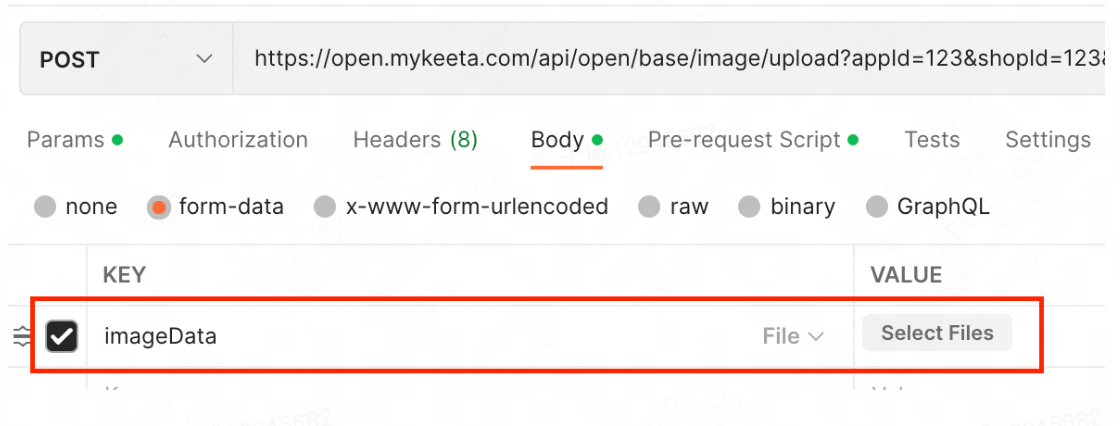
Content-Type Requirement: multipart/form-data
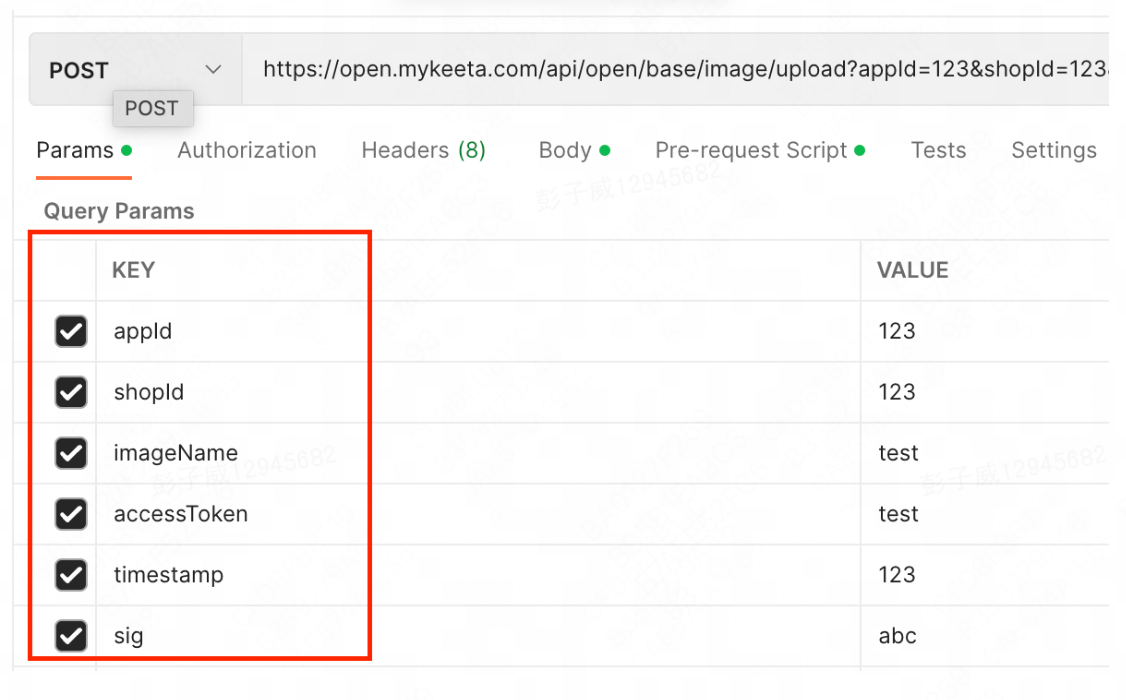
Signature Exclusion: The imgData parameter (containing image byte array) must be excluded from signature calculation.
Image-to-Byte Conversion Reference:
public static byte[] image2byte(String path) throws IOException {
    FileImageInputStream input = null;
    ByteArrayOutputStream output = null;
    try {
        input = new FileImageInputStream(new File(path));
        output = new ByteArrayOutputStream();
        byte[] buf = new byte[1024];
        int numBytesRead;
        while ((numBytesRead = input.read(buf)) != -1) {
            output.write(buf, 0, numBytesRead);
        }
        byte[] bytes = output.toByteArray();
        return bytes;
    } finally {
        if (input != null) {
            input.close();
        }
        if (output != null) {
            output.close();
        }
    }
}
Parameter Location Rules: imgData parameter must be placed in the request body. Other parameters must be placed in request parameters.
Yes. All signature parameters must be sorted in ASCII lexicographical order, including:
- All parameters except sig
- Empty parameters (with no value)
- For parameters containing JSON values:
- No internal sorting of JSON fields
- Use the original JSON string as-is
- No additional encoding
Perform step-by-step verification:
- Parameter concatenation order (ASCII sorted)
- Inclusion of empty parameters
- URL/body consistency
- AppSecret correctness
No encoding needed. Use Chinese characters directly in their original form during concatenation.
You can easily calculate the correct signature through this tool, helping you quickly verify whether your code implementation is correct. >>> Click here